LogoNano Banana Pro
  • Studio
  • AI Image
  • AI Video
  • Agent
  • Scenes
  • Works
  • Pricing
Logo
Now fully launched and available for all public community usersNovember 2025

Nano Banana Pro Image Generator

Turn a detailed art direction into a controlled visual draft. This Nano Banana Pro workspace is designed for brand boards, text-sensitive layouts, product scenes, and multi-reference edits that need a considered 1K, 2K, or 4K finish.

Loading...

Prompt:
0/10000
Model:
Resolution

When enabled, your work will appear in the public gallery

Loading...

No Preview

AI understands your needs and creates images

Start creating
How to use Nano Banana Pro

Build a visual brief the generator can actually act on

Move from intent to output in three decisions: establish what must be true, give each reference a job, then raise resolution only after the composition is working.

01

Separate fixed requirements from creative range

Name the subject, placement, materials, and exact copy that cannot drift. Then leave a controlled range for mood, lighting, or supporting details.

02

Give every reference a single responsibility

Use one image for product identity, another for colour, another for framing. A purposeful reference set is easier to direct than a loose visual moodboard.

03

Validate hierarchy before final output

Check subject, copy, and reading order at the draft stage. Once those decisions hold, select the final format and resolution for delivery.

Core strengths of Nano Banana Pro

What stands out about Nano Banana Pro for structured creative work

Nano Banana Pro is most useful when the brief is structured, the image needs readable text or board logic, and several references should support one polished hosted result.

Strong for structured editing and packaging refreshes

Nano Banana Pro is useful when the task is not just 'make an image' but 'change this product or board in a controlled way.'

That helps with packaging refreshes, product updates, and review-board style edits.
It works best when the brief is explicit about what should stay and what should change.
Use it when structured edits matter more than pure visual mood.

Useful for readable layouts and menu-style assets

Nano Banana Pro is a strong fit when the image includes real copy, labels, or layout hierarchy and the text needs to stay readable.

That makes it useful for menus, posters, explainers, and information-led marketing assets.
It is a better fit when the words are part of the design instead of decoration.
The structured prompt style suits layout-aware image tasks well.

A good route for review boards and concept sheets

Nano Banana Pro works well for product boards, concept sheets, and other structured visuals that combine hero images with labeled direction.

That helps with internal creative reviews and art-direction boards.
It is useful when one image should communicate more than one visual decision.
The model works best when each section of the board is named clearly.

Practical when several references shape one output

Nano Banana Pro is also useful when several product, styling, or palette references all need to inform one hosted image result.

That helps with travel kits, retail systems, and larger product families.
It gives the model more structure when one reference would be too narrow.
Use it when multiple inputs all have a clear role.
Best use cases

Where Nano Banana Pro is most useful

Nano Banana Pro is most useful when the request combines product detail, readable text, structured layout, and several references in one hosted workflow.

Packaging refreshes and product boards

Use it for product boards, packaging updates, and premium brand concepts when product identity and layout both need to stay controlled.

Menus, posters, and label-aware visuals

It is a stronger fit when headings, short descriptions, or labels need to remain readable inside the image instead of becoming texture.

Multi-reference edits with one polished output

Bring in several references when product form, environment, styling, or palette all need to inform the same final image.

High-resolution marketing assets

Use Nano Banana Pro when you already know the visual direction and want a cleaner route to higher-resolution outputs for campaign work.

Prompt patterns and examples

How to write better Nano Banana Pro prompts with real examples

Each example shows the kind of structured prompt Nano Banana Pro handles well. Focus on hierarchy, exact wording, and what each reference image should contribute.

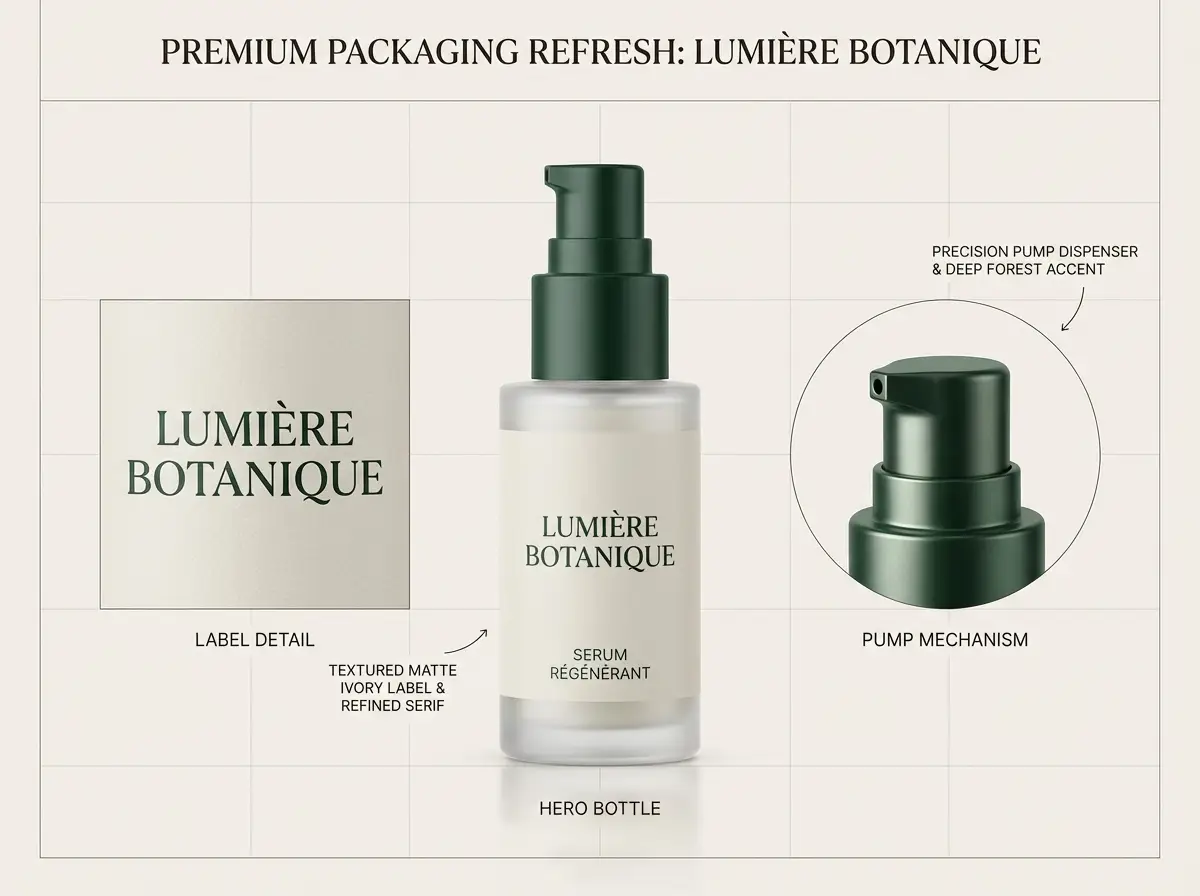
Packaging concept

Leading prompt Alignment Benchmark Standards

Best for premium packaging refreshes that need a polished board, short labels, and clear art direction.

A premium packaging refresh board for a skincare bottle with clean labels and refined layout.

Premium packaging refresh board

Proven industry-standard Prompt best-practice generation workflow guide

[product] + [what should stay] + [new label direction] + [materials / palette] + [board presentation]

Dive into Complete prompt Documentation and Technical SpecificationsReveal Full Comprehensive Breakdown

Detailed prompt Breakdown and Overview

Create a premium packaging refresh board for a glass skincare bottle. Keep the bottle silhouette and pump structure consistent. Update the label direction to matte ivory with deep forest accents and a refined serif headline. Show one hero bottle, one close crop of the label, and short callouts that read "keep bottle shape", "new serif label", and "premium wellness palette". Use soft studio light, realistic reflections, and a clean design-review layout.

Core Functional Components That Enable This Prompt To Deliver Standout, High-quality Outputs

Nano Banana Pro handles structured boards better when the prompt separates the stable product identity from the new label direction.

Desired Final Generated Project Outcome

A polished concept board for packaging reviews, brand design, or launch planning.

Expert Insider Tips for Creative Industry Professionals

  • Say what must stay the same before listing what should change.
  • Use short callouts instead of long sentences when the image needs readable labels.
Text-aware layout

Leading prompt Alignment Benchmark Standards

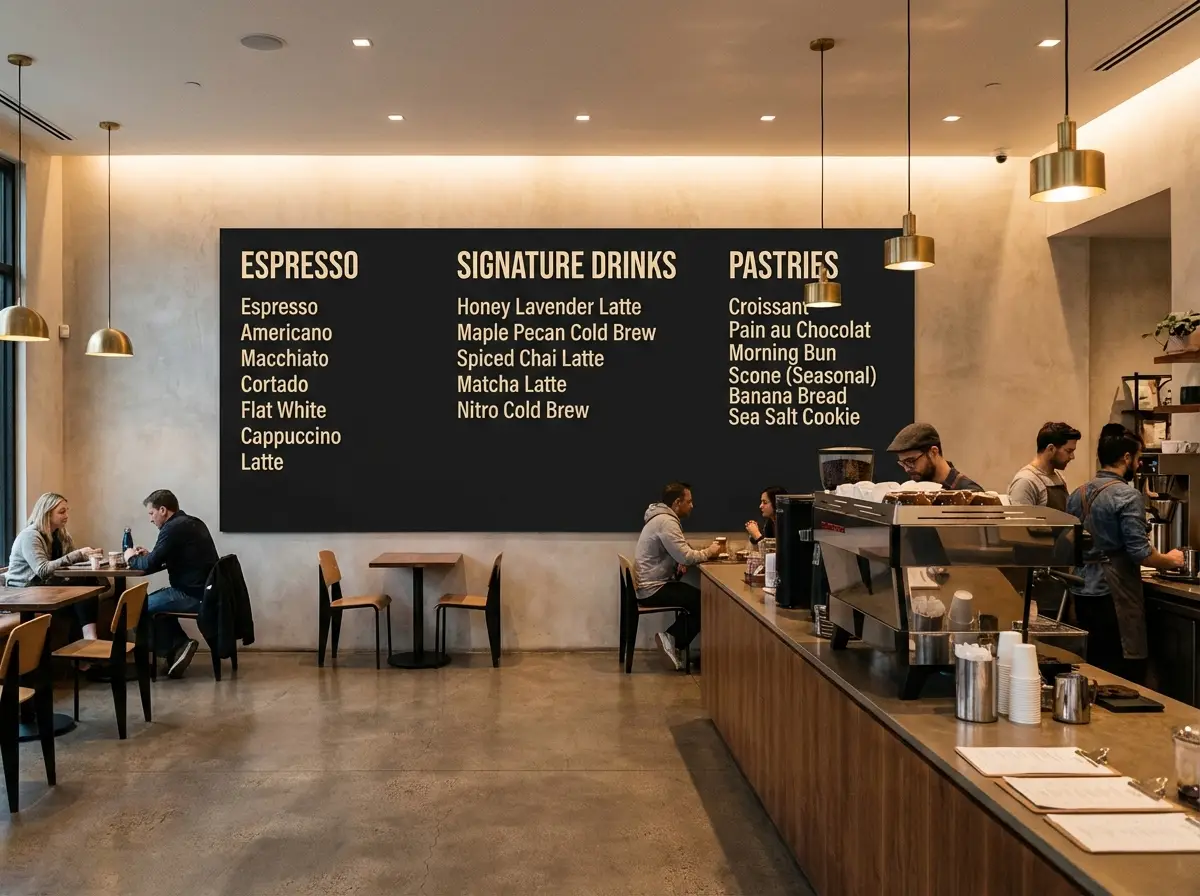
Best for menu boards and poster layouts where the text should still read like real copy.

A readable cafe menu board with clean category headings and a premium interior presentation.

Readable cafe menu board

Proven industry-standard Prompt best-practice generation workflow guide

[menu subject] + [exact headings] + [layout structure] + [interior style] + [readability note]

Dive into Complete prompt Documentation and Technical SpecificationsReveal Full Comprehensive Breakdown

Detailed prompt Breakdown and Overview

Design a premium cafe menu board mounted inside a modern coffee bar. Use large readable category headings: "Espresso", "Signature Drinks", and "Pastries". Under each heading, add two short menu lines with simple pricing. Keep the board matte black with warm cream text, clean spacing, and a layout that feels like a real hospitality brand rather than decorative chalk art. Use soft indoor lighting and a realistic cafe interior around the board.

Core Functional Components That Enable This Prompt To Deliver Standout, High-quality Outputs

This prompt keeps the text short, names the hierarchy, and tells the model that readability matters more than decorative typography.

Desired Final Generated Project Outcome

A readable menu concept for hospitality brands, cafe mockups, or retail visual direction.

Expert Insider Tips for Creative Industry Professionals

  • Keep the copy short enough for the layout to stay plausible.
  • Describe the board style and the surrounding environment separately.
Product marketing

Leading prompt Alignment Benchmark Standards

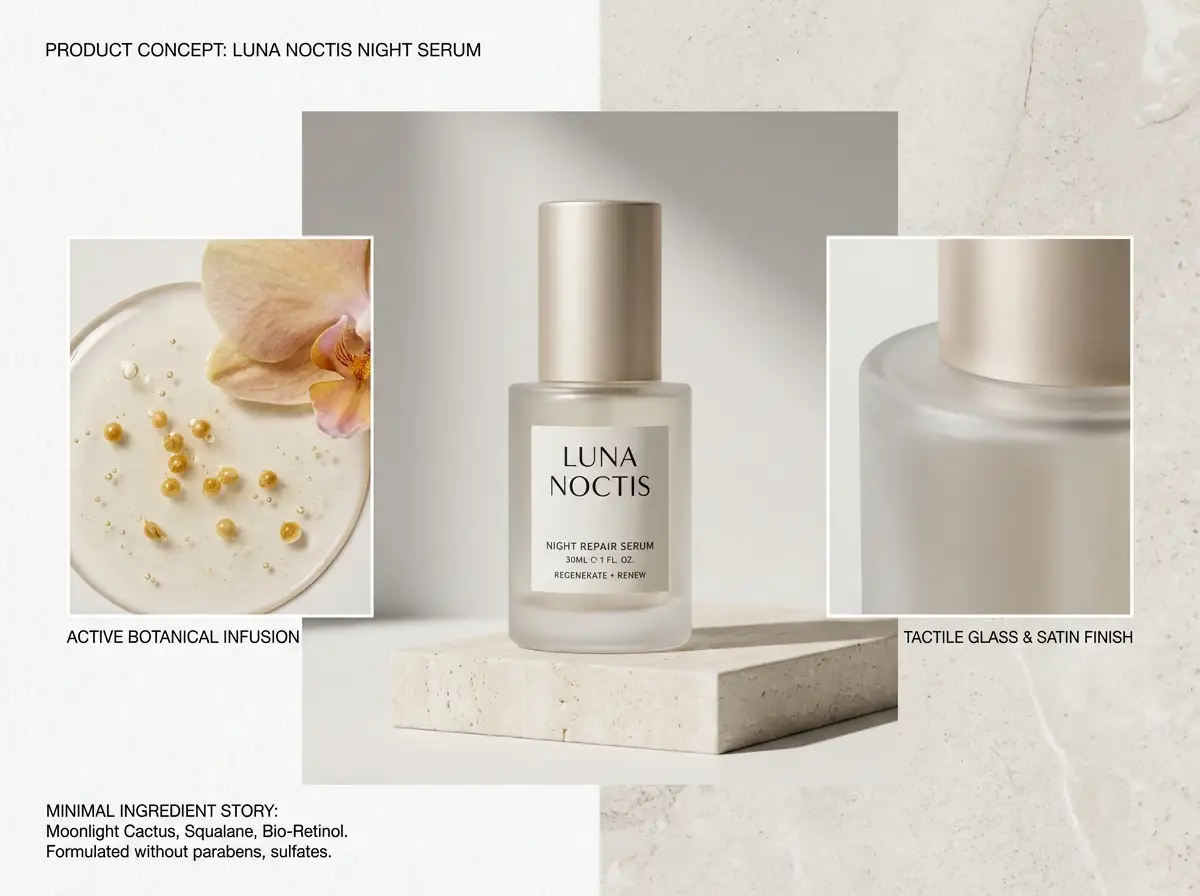
Best for premium product boards that mix a hero render, callouts, and short structured notes.

A skincare product board with a hero bottle, detail crops, and labeled design callouts.

Skincare product concept board

Proven industry-standard Prompt best-practice generation workflow guide

[product] + [board sections] + [callout labels] + [brand mood] + [studio presentation]

Dive into Complete prompt Documentation and Technical SpecificationsReveal Full Comprehensive Breakdown

Detailed prompt Breakdown and Overview

Create a skincare product concept board for a night serum. Show one large hero bottle in the center, two smaller detail crops, and short callout labels that read "glass bottle", "soft satin cap", and "minimal ingredient story". Use a white and pale stone background, restrained editorial typography, luxury skincare lighting, and a clean art-direction board layout suitable for an internal design review.

Core Functional Components That Enable This Prompt To Deliver Standout, High-quality Outputs

Nano Banana Pro is stronger when the prompt gives a board structure instead of asking for a single floating beauty shot plus labels.

Desired Final Generated Project Outcome

A structured product board for brand reviews, launch decks, or internal visual alignment.

Expert Insider Tips for Creative Industry Professionals

  • Name the board sections directly so the composition feels planned.
  • Use 2 to 4 short labels, not a paragraph of text.
Multi-reference edit

Leading prompt Alignment Benchmark Standards

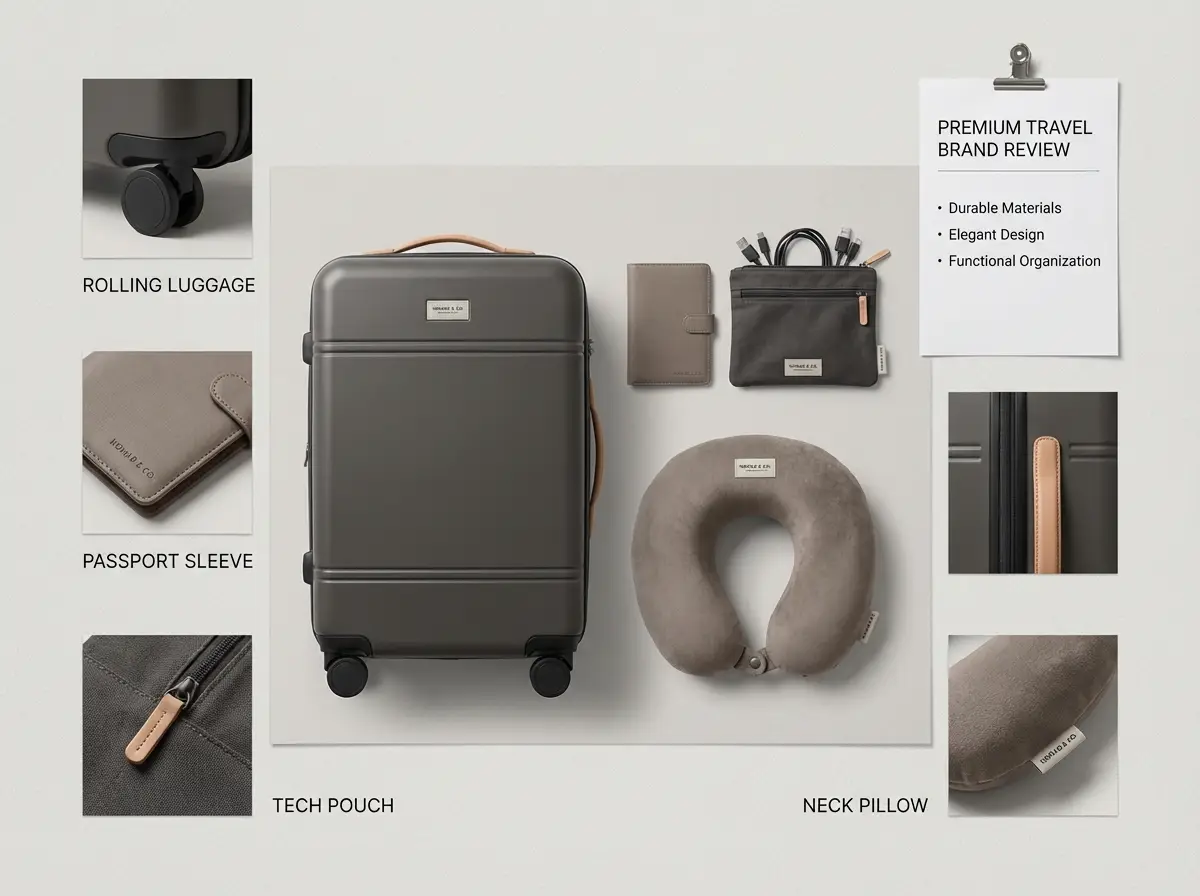
Best for multi-reference boards where product pieces, palette, and layout need to come from different inputs.

A travel kit concept board combining luggage, accessories, and coordinated color direction from multiple references.

Multi-reference travel kit concept

Proven industry-standard Prompt best-practice generation workflow guide

[hero kit] + [reference roles] + [what should stay consistent] + [layout mood] + [output format]

Dive into Complete prompt Documentation and Technical SpecificationsReveal Full Comprehensive Breakdown

Detailed prompt Breakdown and Overview

Create a premium travel essentials concept board using multiple references. Use one reference for the luggage silhouette, one for the pouch material, and one for the neutral taupe and charcoal color palette. Show the kit as a clean flat-lay board with a carry-on, passport sleeve, charging pouch, and neck pillow. Keep the styling cohesive, minimal, and realistic, with short labels for each item and a layout that feels like a premium travel brand review sheet.

Core Functional Components That Enable This Prompt To Deliver Standout, High-quality Outputs

The prompt assigns a role to each reference and tells the model how the final board should unify them.

Desired Final Generated Project Outcome

A multi-reference concept board that merges several product directions into one polished visual.

Expert Insider Tips for Creative Industry Professionals

  • State what each reference controls instead of uploading many images without roles.
  • Ask for one unified board, not several disconnected scenes.
FAQs

FAQ

Your top questions answered

What is Nano Banana Pro?

Nano Banana Pro is the high-control image workspace in this product. Use it when an image needs to follow a detailed brief instead of improvising from a short visual idea.

What is Nano Banana Pro best for?

It is most useful for work that has several constraints at once: a recognisable product, an organised layout, short in-image copy, a defined palette, or a set of references that must resolve into one direction.

Does Nano Banana Pro support image input here?

Yes. You can provide up to eight references in this workspace. Assign each one a role in the prompt—for example product shape, styling, colour, or composition—so the final image has an explicit decision hierarchy.

Which resolutions and aspect ratios does Nano Banana Pro support here?

This page offers 1K, 2K, and 4K output. Choose the aspect ratio before you optimise detail: square for catalog or social tiles, vertical for mobile placements, and wide formats for campaign headers or presentation frames.

How do I write better Nano Banana Pro prompts?

Write in production order: subject first, composition second, references third, then lighting, material, and any exact copy. State what must remain unchanged and what is free to explore; this is more reliable than stacking visual keywords.

When should I use Nano Banana Pro instead of Nano Banana Flash or Nano Banana 2?

Choose Pro when the image will be reviewed for structure and finish. Choose Flash for quick option generation. Choose Nano Banana 2 when current context or a larger reference set should shape the brief.

Can Nano Banana Pro generate readable text in images?

It is a better choice when words are part of the composition rather than decoration. Keep copy short, quote it exactly, and describe the hierarchy so labels, headlines, and callouts have a clear role.

Can I use Nano Banana Pro images commercially?

Review every final asset before publication. Confirm brand ownership, factual claims, likenesses, and any platform or campaign requirements; generation is one step in the production process, not legal clearance.

Have more questions? We're here to help

Try Nano Banana Pro here

Open the generator, start with a detailed prompt, and add the reference images that should actually guide the output.

LogoNano Banana Pro

Powered by Google Nano Banana Pro | Next-Gen beyond nanobanana | 30+ Scenes 95% Consistency

TwitterX (Twitter)Email
Resources
  • Studio
  • Agent Chat
  • Scenes
  • Works
  • My Videos
AI Image
  • AI Image Generator
  • Image to Prompt
  • Batch Image to Prompt
  • Nano Banana Pro
  • Nano Banana Flash
  • Nano Banana 2
  • Nano Banana 2 Lite
AI Video
  • AI Video Generator
  • Doubao Seedance
  • Kling 3.0
  • Kling 3.0 Pro
  • Seedance 2
  • Seedance 2.1
  • HappyHorse
Company
  • About
  • Contact
Legal
  • Privacy Policy
  • Terms of Service
  • Refund Policy
© 2026 Nano Banana Pro All Rights Reserved. DREAMEGA INFORMATION TECHNOLOGY LLC
support@nanobanana-pro.orgSoPilot logoFEATURED ONSoPilot