LogoNano Banana Pro
  • Studio
  • AI Image
  • AI Video
  • Agent
  • Scenes
  • Works
  • Pricing
Logo
Now fully launched and available for all public community usersAugust 2025

Nano Banana Flash Image Generator

Use Nano Banana Flash when momentum matters. It is the practical workspace for trying alternative campaign directions, refreshing a product scene, or turning a handful of references into reviewable image variations without building a heavyweight production brief.

Loading...

Prompt:
0/5000
Model:

When enabled, your work will appear in the public gallery

Loading...

No Preview

AI understands your needs and creates images

Start creating
How to use Nano Banana Flash

Use Nano Banana Flash here for faster image generation and editing loops

Start with a direct prompt, add references when they help, and move through short edit cycles until the concept is ready to keep or hand off.

01

State the visual task clearly

Say what you want to generate or change, what should stay fixed, and what kind of output you need in the end.

02

Add the references that define the direction

Use up to ten references when you want Nano Banana Flash to blend product identity, layout, styling, or mood across a faster workflow.

03

Iterate in short, specific edits

Ask for one or two changes at a time so you can compare versions quickly and keep the editing loop moving.

Core strengths of Nano Banana Flash

What stands out about Nano Banana Flash when speed matters

Nano Banana Flash is the faster route in this family. It is most useful when edits, boards, and social assets need to come together quickly without waiting on a heavier polished pass.

Fast enough for quick edit-turnaround work

Nano Banana Flash is useful when room refreshes, product swaps, or layout changes need to happen quickly in a hosted tool.

That makes it practical for fast creative iteration and quick review changes.
It works best when you know the direction and want speed more than perfect finish.
Use it when the job is to move quickly through alternatives.

Practical for storyboard-like and panelled assets

Flash also works well for boards, panels, and fast multi-part layouts when the image should communicate several beats at once.

That helps with product storyboards and launch-sequence concepts.
The faster workflow is useful when you need several board versions in one session.
It fits tasks where speed is part of the decision.

Useful for lighter multi-image direction

Nano Banana Flash can also help when several inputs influence one collage-like or board-like image, but the workflow should stay fast.

That is useful for sneaker variants, travel kits, and fast comparison sheets.
It gives more structure than a single image without moving to a slower route.
Use it when you need direction quickly, not maximum polish.

A good fit for fast social launch assets

Flash is a practical route for snackable launch visuals, quick promos, and social-first creative when turnaround is part of the requirement.

That makes it useful for fast ad variants and seasonal social creatives.
It performs best when the image goal is clear and compact.
Choose it when speed and volume matter more than finish.
Best use cases

Where Nano Banana Flash works best

Nano Banana Flash works best when the job needs quick concepting, quick edits, or several short rounds of visual iteration inside one hosted model.

Fast social and campaign drafts

Use it for social launch visuals, ad concepts, and quick creative options when you want a fast first pass instead of a fully polished final immediately.

Room, product, and scene refresh edits

A practical fit for quick before-and-after style edits where the structure already exists and the goal is to change look, styling, or detail.

Multi-image blends and mood boards

Bring in several references when you want to combine product cues, textures, or brand direction into one faster concept output.

Storyboards and sequential variations

Use Nano Banana Flash for panels, draft sequences, or fast versioning when you care more about speed and coverage than one perfect final frame.

Prompt patterns and examples

How to write better Nano Banana Flash prompts with real examples

These examples focus on tasks where Nano Banana Flash shines: fast edits, practical layout changes, and quick concepting with several short prompt passes.

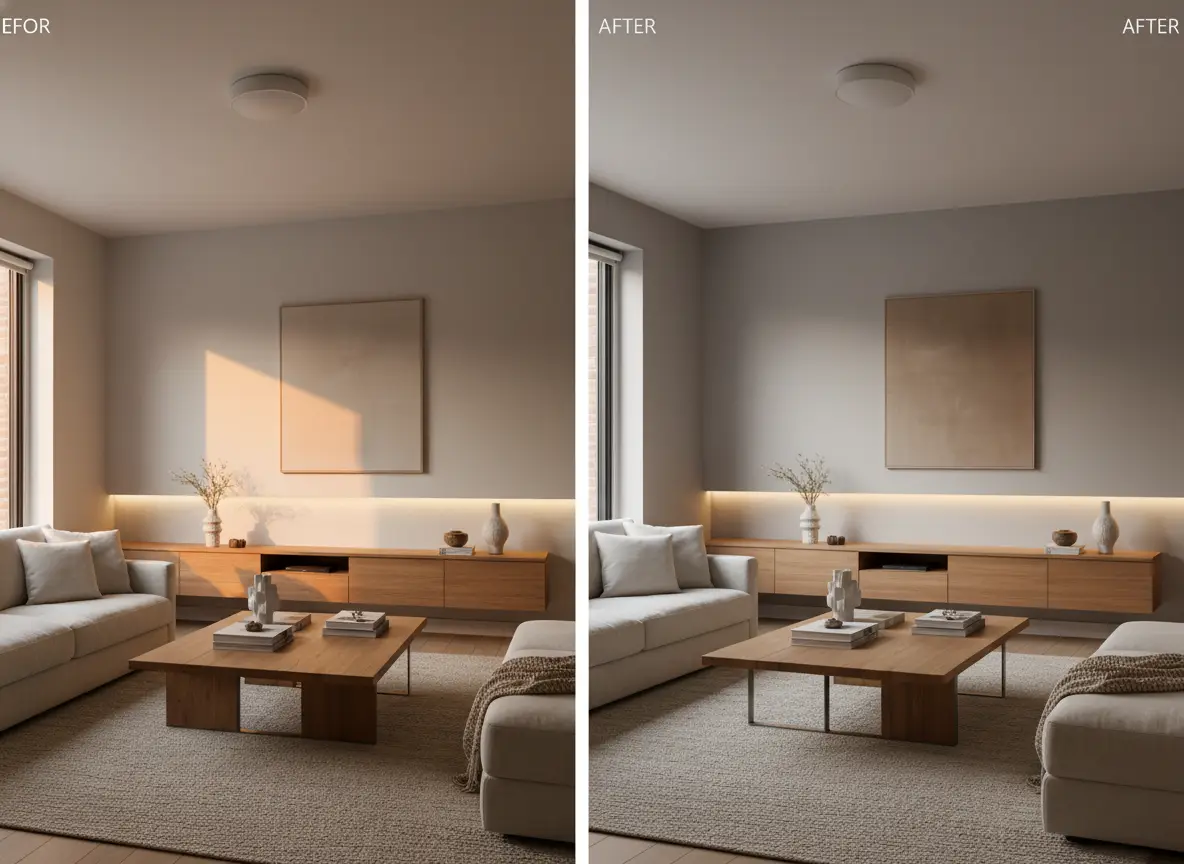
Interior edit

Leading prompt Alignment Benchmark Standards

Best for quick room refreshes where the structure should stay but the look needs to change fast.

A fast living-room refresh edit with warmer materials and a cleaner styling direction.

Fast living-room refresh edit

Proven industry-standard Prompt best-practice generation workflow guide

[what stays] + [what changes] + [new style direction] + [lighting mood] + [usage goal]

Dive into Complete prompt Documentation and Technical SpecificationsReveal Full Comprehensive Breakdown

Detailed prompt Breakdown and Overview

Keep the living-room layout and camera angle from the reference image. Refresh the room with warm oak accents, a lighter linen sofa, soft indirect afternoon light, and a calmer premium-home styling direction. Make it look like a realistic interior refresh for a design studio presentation, not a full renovation.

Core Functional Components That Enable This Prompt To Deliver Standout, High-quality Outputs

This kind of narrow edit request suits Nano Banana Flash because the change list is clear and easy to iterate in several quick passes.

Desired Final Generated Project Outcome

A believable before-and-after style refresh for interior design, staging, or campaign concept work.

Expert Insider Tips for Creative Industry Professionals

  • List what stays first so the scene does not drift too far.
  • Keep the edit scope narrow enough for a fast model to follow cleanly.
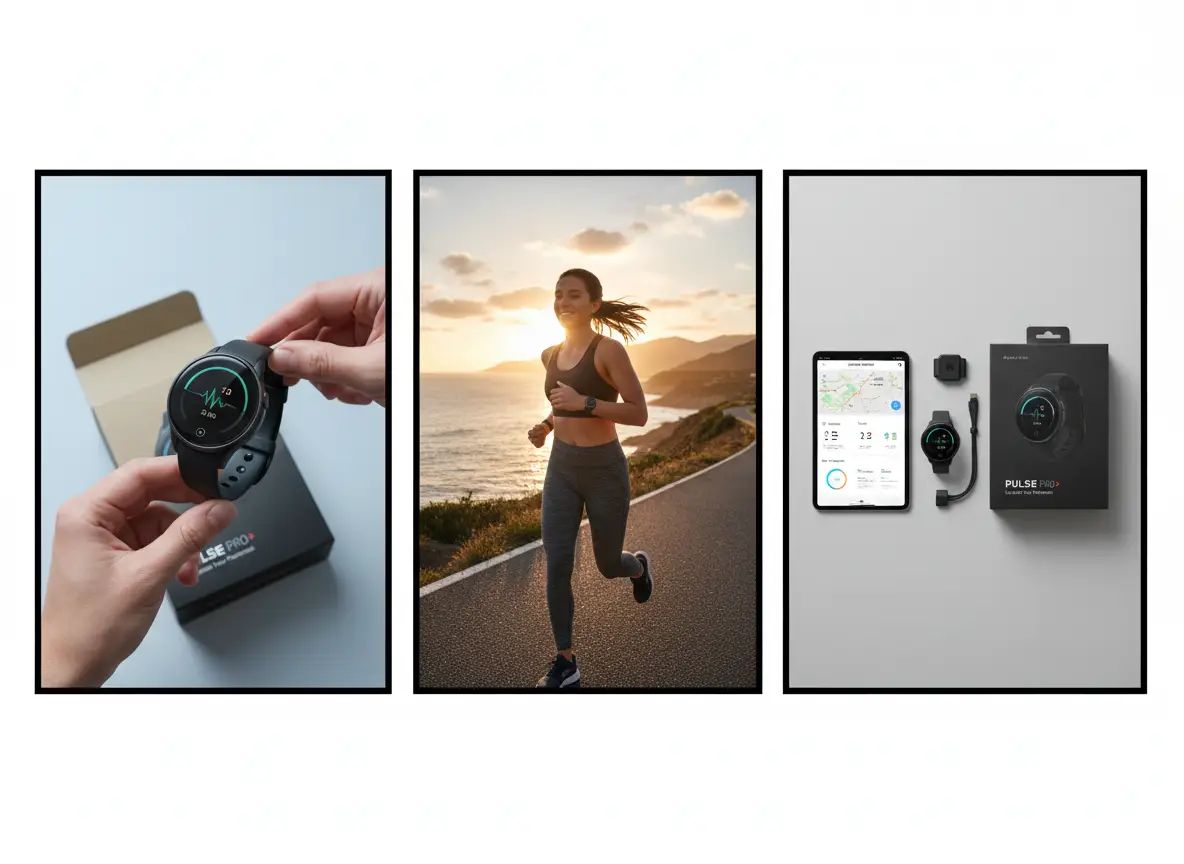
Storyboard

Leading prompt Alignment Benchmark Standards

Best for quick panel-based concepting when you want to see a simple sequence before polishing.

A three-panel product storyboard for a wearable device launch concept.

Three-panel product storyboard

Proven industry-standard Prompt best-practice generation workflow guide

[subject] + [number of panels] + [what each panel shows] + [visual style] + [presentation note]

Dive into Complete prompt Documentation and Technical SpecificationsReveal Full Comprehensive Breakdown

Detailed prompt Breakdown and Overview

Create a three-panel storyboard for a wearable fitness tracker launch. Panel one: close-up product reveal on a clean background. Panel two: runner wearing the tracker outdoors at sunrise. Panel three: product resting beside the app screen and packaging. Use a modern commercial style, clear panel separation, and a fast concepting feel rather than a finished ad campaign.

Core Functional Components That Enable This Prompt To Deliver Standout, High-quality Outputs

Nano Banana Flash is useful when you want several frames or variations quickly without waiting on a heavier production-style render.

Desired Final Generated Project Outcome

A fast storyboard draft for campaign planning, internal alignment, or creative direction.

Expert Insider Tips for Creative Industry Professionals

  • Say exactly how many panels you want.
  • Describe one role for each panel so the sequence stays readable.
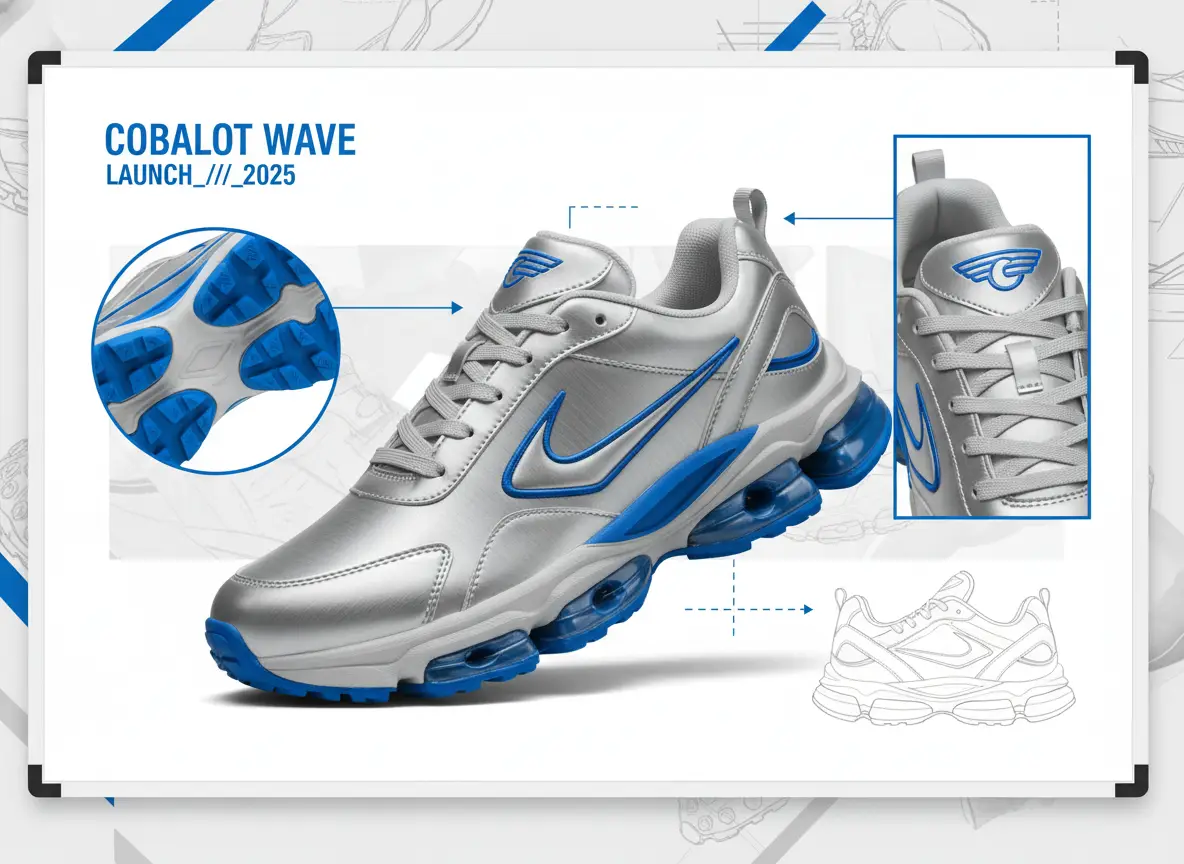
Multi-image blend

Leading prompt Alignment Benchmark Standards

Best for quicker mood-board style blends that combine materials, silhouette, and campaign direction from several references.

A sneaker collage concept blending references for silhouette, materials, and campaign styling.

Multi-image sneaker collage concept

Proven industry-standard Prompt best-practice generation workflow guide

[hero object] + [reference roles] + [blend direction] + [layout] + [brand mood]

Dive into Complete prompt Documentation and Technical SpecificationsReveal Full Comprehensive Breakdown

Detailed prompt Breakdown and Overview

Create a sneaker concept collage using multiple references. Use one reference for the shoe silhouette, one for metallic silver material direction, one for bright cobalt accents, and one for the campaign mood. Present the result as a fast concept board with one hero sneaker, two supporting detail angles, and a bold sportswear launch energy on a clean background.

Core Functional Components That Enable This Prompt To Deliver Standout, High-quality Outputs

The prompt gives each reference a specific role, which helps a faster model combine them without turning into visual noise.

Desired Final Generated Project Outcome

A quick blend-style concept board that helps a creative team compare directions before choosing a final path.

Expert Insider Tips for Creative Industry Professionals

  • Tell the model what each reference controls.
  • Ask for one hero object plus a few supporting views, not a crowded collage.
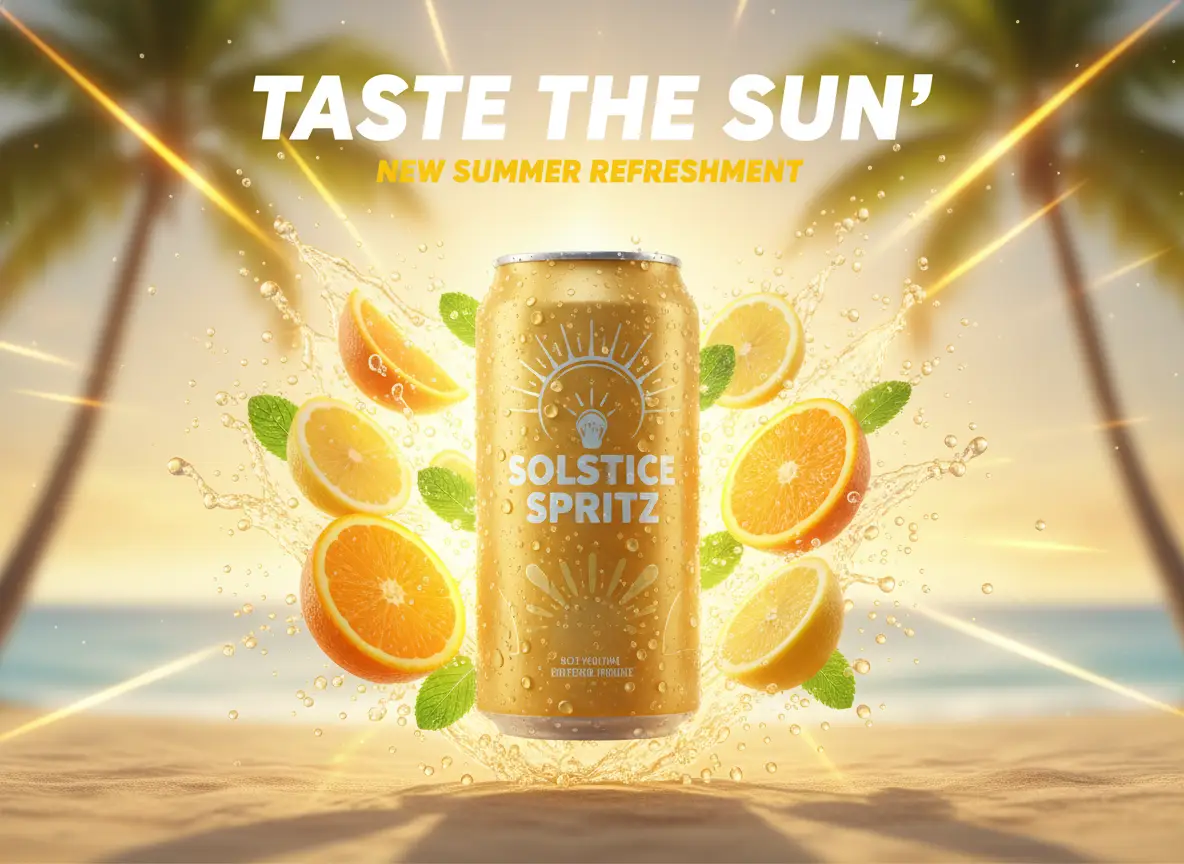
Social draft

Leading prompt Alignment Benchmark Standards

Best for social launch visuals when speed matters more than squeezing every last detail out of the image.

A quick social launch visual for a beverage campaign with bright color and product focus.

Quick social launch visual

Proven industry-standard Prompt best-practice generation workflow guide

[campaign subject] + [hero composition] + [headline mood] + [platform usage] + [color / lighting]

Dive into Complete prompt Documentation and Technical SpecificationsReveal Full Comprehensive Breakdown

Detailed prompt Breakdown and Overview

Create a fast social launch visual for a sparkling citrus drink. Show one cold can with condensation, a bright splash of citrus slices, a clean centered composition, and room for a short headline at the top. Use warm summer daylight, bold yellow and orange accents, and a visual style that feels ready for an Instagram announcement draft.

Core Functional Components That Enable This Prompt To Deliver Standout, High-quality Outputs

This type of social-first brief is short, direct, and easy to iterate, which plays to Nano Banana Flash's speed advantage.

Desired Final Generated Project Outcome

A fast social-first campaign draft that can be reviewed or iterated quickly.

Expert Insider Tips for Creative Industry Professionals

  • Name the platform or placement so the crop feels intentional.
  • Keep the headline instruction simple if text is not the main point.
FAQs

FAQ

Your top questions answered

What is Nano Banana Flash?

Nano Banana Flash is the fast-turnaround image workspace in this product. It is for turning a clear creative instruction into several usable directions before a team commits to a heavier production pass.

What is Nano Banana Flash best for?

Use it for option-rich work: campaign thumbnails, product refreshes, social cutdowns, layout alternatives, or a rapid storyboard pass where comparing directions matters more than perfecting one render.

Does Nano Banana Flash support image input here?

Yes. This workspace accepts up to ten references. Keep the set purposeful: identify which image supplies the product, which sets the palette, and which defines the framing before you ask for a blend.

Which aspect ratios does Nano Banana Flash support here?

Choose from square, portrait, landscape, or automatic framing. Match the frame to the destination first—vertical for mobile, wide for banners, and square for grid-based placements—then iterate the scene inside it.

How do I write better Nano Banana Flash prompts?

Use one edit objective per pass. Say what must change, what must stay, and where the image will be used; small, explicit revisions make it easier to compare outputs and preserve a useful direction.

When should I use Nano Banana Flash instead of Nano Banana Pro or Nano Banana 2?

Choose Flash to explore fast. Choose Pro when the approved asset needs more structural control and finish. Choose Nano Banana 2 when current context or a larger evidence-led reference set belongs in the brief.

Is Nano Banana Flash good for editing existing images?

Yes. It is especially useful for controlled variation: keep the recognisable object, then test a new environment, styling, crop, palette, or presentation without rewriting the entire concept.

Can I use Nano Banana Flash images commercially?

Treat a generated draft as review material. Before publishing, check ownership, brand accuracy, factual claims, and campaign requirements rather than relying on generation alone.

Have more questions? We're here to help

Try Nano Banana Flash here

Open the generator, start with a direct prompt, and iterate quickly through edits, blends, and campaign drafts.

LogoNano Banana Pro

Powered by Google Nano Banana Pro | Next-Gen beyond nanobanana | 30+ Scenes 95% Consistency

TwitterX (Twitter)Email
Resources
  • Studio
  • Agent Chat
  • Scenes
  • Works
  • My Videos
AI Image
  • AI Image Generator
  • Image to Prompt
  • Batch Image to Prompt
  • Nano Banana Pro
  • Nano Banana Flash
  • Nano Banana 2
  • Nano Banana 2 Lite
AI Video
  • AI Video Generator
  • Doubao Seedance
  • Kling 3.0
  • Kling 3.0 Pro
  • Seedance 2
  • Seedance 2.1
  • HappyHorse
Company
  • About
  • Contact
Legal
  • Privacy Policy
  • Terms of Service
  • Refund Policy
© 2026 Nano Banana Pro All Rights Reserved. DREAMEGA INFORMATION TECHNOLOGY LLC
support@nanobanana-pro.orgSoPilot logoFEATURED ONSoPilot